
2010年12月10日星期五


2010年11月21日星期日
Omnifocus 專用的WebDAV服務 mydisk.se
使用Omnifocus很久了.雖然用的不好.但一直努力中
但同步問題一直都沒法解決.
雖然目前可以用Bonjour讓mbp和iPhone同步.但常常會發生兩個裝置各自都做了變更而需要放棄其中一個的困難.
經過長期的尋找,終於,在omnifocus官網的論譠上看到有人分享.
https://mydisk.se/
使用很簡單,註冊好馬上可以用.
一開始註冊的帳號就有2g的空間可以用.要更多的空間就要錢了.
有空再來看看發個教程吧.要是有人需要的話.
2010年7月2日 下午2:59更新教程
做完以下這些動作可以完成幾件事情
1.讓mac及iphone可以經由雲端同步
2.讓mac及iphone上的行事曆加入OF中的工作內容
3.在google日曆中加入OF中的工作內容.
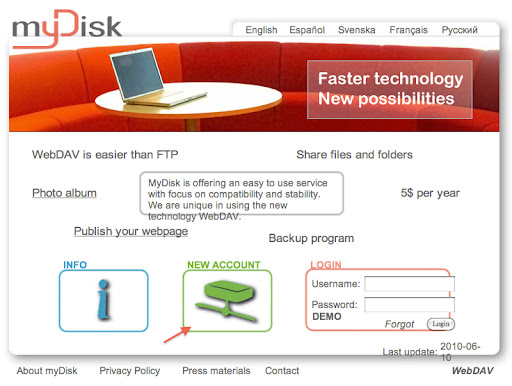
連結上https://mydisk.se/,點選new account
輸入帳號密碼等
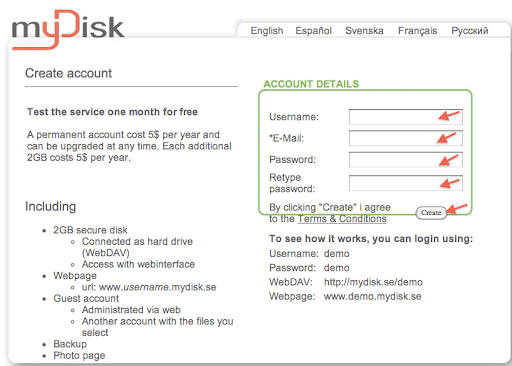
到這邊你的帳號就申請完成了,很簡單吧.
再來還需要設定一下,我們不要直接使用根目錄來做同步.而且iphone版omnifocus在同步後可以產生iCal的輸入檔,這可以利用來將OF中的工作輸入到iCal中作為事件.因此,我們需要讓這個檔案可以在網路中存取.
但請特別注意,這代表任何知道此網址的人都可以看到你的omnifocus設定檔案.關於這點,我還沒有什麼好方法可以解決.
設定如下
在網頁中點選“share”
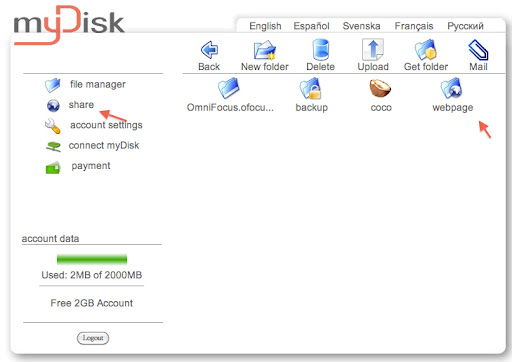
再點選“Webpage”
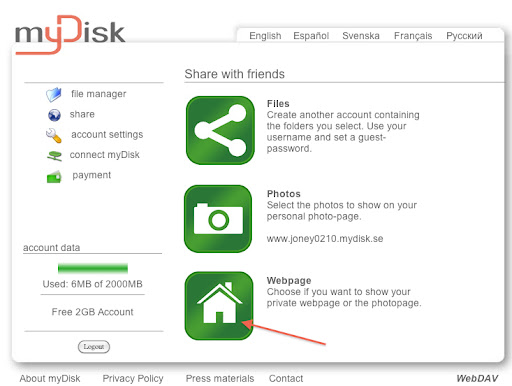
再選取“Webpage”這個選項
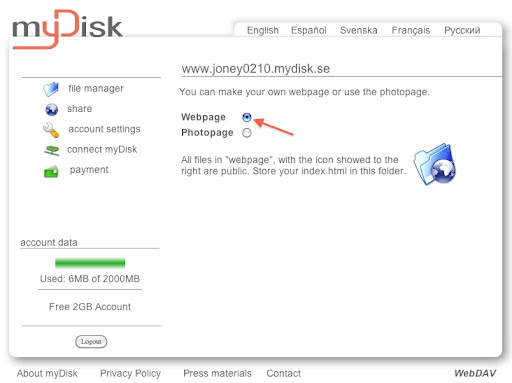
如此一來,就可以開始設定Mac中的OF了.
首先打開OF偏好設定,選擇“同步”頁次,再選擇“高級”,輸入“https://mydisk.se/your account/webpage/
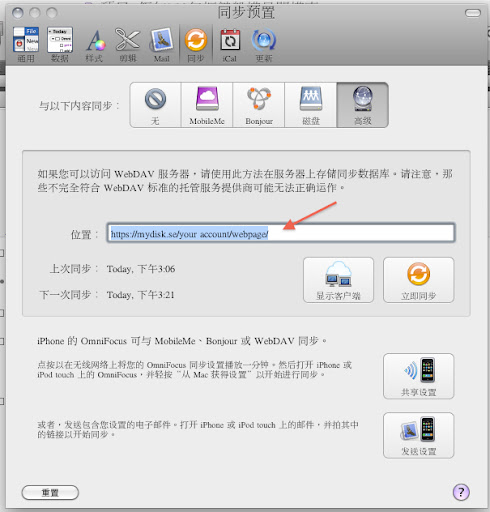
再來可以按下”顯示客戶端“,輸入密碼後應該可以顯示你有連線上去了.
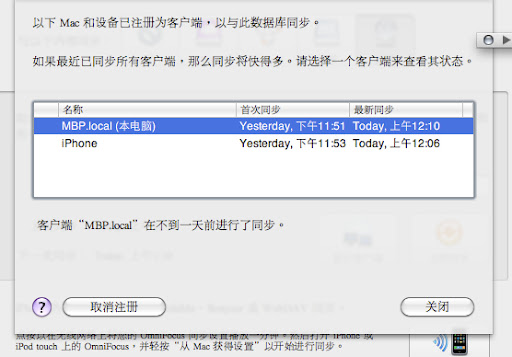
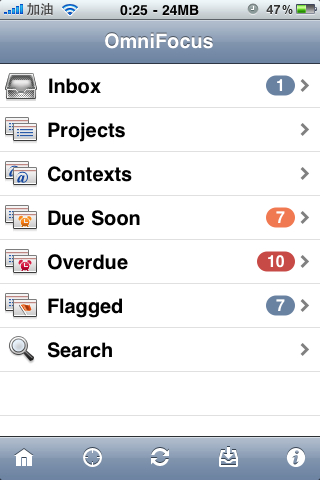
按下關閉後,點擊共享設置,在這裡你需要將mac及iphone都連上本地網路.
 http://lh4.ggpht.com/_AV0xQ8ORNPA/TC2gaoHcUwI/AAAAAAAAAD0/xokj7r7WPIQ/mydisk.se.7.cT2aAId6XzLn.jpg
再打開iphone上的OF
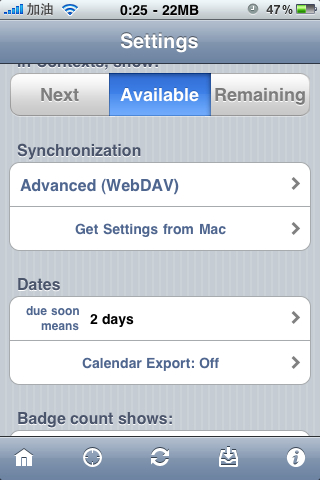
點擊右下角的小i,進入設定頁面,點擊”Get Settings from Mac“,取得mac上分享出來的設定.
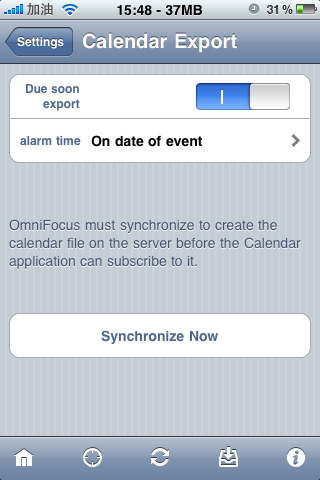
並把底下的”Dates“中的”calendar Export:off“開關設為開.再點選底下的”Synchronie Now“(此時應該顯示為”subscribe calendar“,我已設定完了,所以顯示不一樣),讓iphone上的行事曆可以加入omnifocus中的工作內容.
到此.上面寫的前兩項事情已經完成了.
第三項事情就是到google日曆中去訂閱”http://mydisk.se/your account/webpage/OmniFocus-Reminders.ics“, 再於MAC中的iCal中訂閱google日曆.
http://bbs.weiphone.com/read-htm-tid-866884.html
但同步問題一直都沒法解決.
雖然目前可以用Bonjour讓mbp和iPhone同步.但常常會發生兩個裝置各自都做了變更而需要放棄其中一個的困難.
經過長期的尋找,終於,在omnifocus官網的論譠上看到有人分享.
https://mydisk.se/
使用很簡單,註冊好馬上可以用.
一開始註冊的帳號就有2g的空間可以用.要更多的空間就要錢了.
有空再來看看發個教程吧.要是有人需要的話.
2010年7月2日 下午2:59更新教程
做完以下這些動作可以完成幾件事情
1.讓mac及iphone可以經由雲端同步
2.讓mac及iphone上的行事曆加入OF中的工作內容
3.在google日曆中加入OF中的工作內容.
連結上https://mydisk.se/,點選new account
輸入帳號密碼等
到這邊你的帳號就申請完成了,很簡單吧.
再來還需要設定一下,我們不要直接使用根目錄來做同步.而且iphone版omnifocus在同步後可以產生iCal的輸入檔,這可以利用來將OF中的工作輸入到iCal中作為事件.因此,我們需要讓這個檔案可以在網路中存取.
但請特別注意,這代表任何知道此網址的人都可以看到你的omnifocus設定檔案.關於這點,我還沒有什麼好方法可以解決.
設定如下
在網頁中點選“share”
再點選“Webpage”
再選取“Webpage”這個選項
如此一來,就可以開始設定Mac中的OF了.
首先打開OF偏好設定,選擇“同步”頁次,再選擇“高級”,輸入“https://mydisk.se/your account/webpage/
再來可以按下”顯示客戶端“,輸入密碼後應該可以顯示你有連線上去了.
按下關閉後,點擊共享設置,在這裡你需要將mac及iphone都連上本地網路.
 http://lh4.ggpht.com/_AV0xQ8ORNPA/TC2gaoHcUwI/AAAAAAAAAD0/xokj7r7WPIQ/mydisk.se.7.cT2aAId6XzLn.jpg
再打開iphone上的OF
點擊右下角的小i,進入設定頁面,點擊”Get Settings from Mac“,取得mac上分享出來的設定.
並把底下的”Dates“中的”calendar Export:off“開關設為開.再點選底下的”Synchronie Now“(此時應該顯示為”subscribe calendar“,我已設定完了,所以顯示不一樣),讓iphone上的行事曆可以加入omnifocus中的工作內容.
到此.上面寫的前兩項事情已經完成了.
第三項事情就是到google日曆中去訂閱”http://mydisk.se/your account/webpage/OmniFocus-Reminders.ics“, 再於MAC中的iCal中訂閱google日曆.
http://bbs.weiphone.com/read-htm-tid-866884.html
2010年11月10日星期三
verilog 用 ultraedit 终极大法
ltraEdit是一款功能强大的文本编辑器,可以编辑文字、Hex、ASCII码,可以取代记事本,内建英文单字检查、C++ 及 VB指令突显,可同时编辑多个文件,而且即使开启很大的文件速度也不会慢。是一个使用广泛的编辑器,但它并不直接支持HDL。
在网上查了资料后,自定义了一个Verilog的环境,现在心得总结如下:
1:下载Verilog的语法高亮文件。
即可支持相应的语言编辑,关键字将用不同色彩标出。
可以到官方网站去下载,包括上百种语法文件,我想应该都能满足大家的需要吧!
http://www.ultraedit.com/index.php?name=Content&pa=showpage&pid=40#wordfiles
2:将下载的文件打开,将里面的内容复制到WordFile.txt文件中(在UltraEdit的安装目录下),一般加在最后。
UltraEdit默认只有20种语法,将下载的文件的第一行“L20”改成你想要的序号,如L19。
3:加入折叠功能
由于Verilog HDL的块一般是以begin和end作为开始和结束的标记,其作用相当于C语言的
大括号。在wordfile.txt的对应语言中添加进如下代码即可:
/Open Fold Strings = "begin""case"
/Close Fold Strings = "end""endcase"
这里除了begin和end可以进行折叠外,另外一对case和endcase同样可以完成折叠,同样的
方法可以添加你需要的折叠标志。
4:加入自动缩进功能
同样在wordfile.txt中,有控制自动缩进的语法。所谓自动缩进就是指,输入begin回车,下一行自动加一个tab;输入end,下一行自动退回一个tab。用户可以自己添加不同的缩进词实现自动缩进。如:
/Indent Strings = "begin""case""fork" "if" "else"
/Unindent Strings = "end""endcase""join" "else"
5: 还可以加入其它一些自定义功能,如函数调用功能,大家可以自己摸索。
方便大家,做了个压缩包供大家下载。
在网上查了资料后,自定义了一个Verilog的环境,现在心得总结如下:
1:下载Verilog的语法高亮文件。
即可支持相应的语言编辑,关键字将用不同色彩标出。
可以到官方网站去下载,包括上百种语法文件,我想应该都能满足大家的需要吧!
http://www.ultraedit.com/index.php?name=Content&pa=showpage&pid=40#wordfiles
2:将下载的文件打开,将里面的内容复制到WordFile.txt文件中(在UltraEdit的安装目录下),一般加在最后。
UltraEdit默认只有20种语法,将下载的文件的第一行“L20”改成你想要的序号,如L19。
3:加入折叠功能
由于Verilog HDL的块一般是以begin和end作为开始和结束的标记,其作用相当于C语言的
大括号。在wordfile.txt的对应语言中添加进如下代码即可:
/Open Fold Strings = "begin""case"
/Close Fold Strings = "end""endcase"
这里除了begin和end可以进行折叠外,另外一对case和endcase同样可以完成折叠,同样的
方法可以添加你需要的折叠标志。
4:加入自动缩进功能
同样在wordfile.txt中,有控制自动缩进的语法。所谓自动缩进就是指,输入begin回车,下一行自动加一个tab;输入end,下一行自动退回一个tab。用户可以自己添加不同的缩进词实现自动缩进。如:
/Indent Strings = "begin""case""fork" "if" "else"
/Unindent Strings = "end""endcase""join" "else"
5: 还可以加入其它一些自定义功能,如函数调用功能,大家可以自己摸索。
方便大家,做了个压缩包供大家下载。
UltraEdit 语法高亮配置文件
UltraEdit 语法高亮配置文件,只需把下列内容添加到你的wordfile文件后,就可以了。此高亮包含Verilog、VHDL、ARM和GNU Assembler x86 语法高亮。
/L14"Verilog 1364-2001" Line Comment = // Block Comment On = /* Block Comment Off = */ String Chars = " File Extensions = V VL VMD
/Delimiters = ~!@%^&*()-+=|\/{}[]:;"<> , .?#
/Function String = "%[a-z0-9]+[ ^t]+[a-z_0-9]+[ ^t]+("
/Indent Strings = "begin" "fork" "specify" "config"
/Unindent Strings = "end" "join" "endspecify" "endconfig"
/C1"Keywords"
always and assign automatic
begin buf bufif0 bufif1
case casex casez cell cmos config
deassign default defparam design disable
edge else end endcase endconfig endmodule endfunction endgenerate endprimitive endspecify endtable endtask event
for force forever fork function
generate genvar
highz0 highz1
if ifnone initial inout input instance integer
join
large liblist library localparam
macromodule medium module
nand negedge nmos none nor noshowcancelled not notif0 notif1
or output
parameter pulsestyle_onevent pulsestyle_ondetect pmos posedge primitive pull0 pull1 pullup pulldown
real realtime reg release repeat rcmos rnmos rpmos rtran rtranif0 rtanif1
scalared showcancelled signed small specify specparam strength strong0 strong1 supply0 supply1
table task time tran tranif0 tranif1 tri tri1 tri0 triand trior trireg
use
vectored
wait wand weak0 weak1 while wire wor
xnor xor
/C2"System"
** 'b 'B 'o 'O 'd 'D 'h 'H 'sb 'sB 'so 'sO 'sd 'sD 'sh 'sH 'Sb 'SB 'So 'SO 'Sd 'SD 'Sh 'SH
** _
$async$and$array $async$and$plane $async$nand$array $async$nand$plane $async$nor$array $async$nor$plane $async$or$array $async$or$plane
$bitstoreal
$countdrivers
$display $displayb $displayh $displayo
$dist_chi_square $dist_erlang $dist_exponential $dist_normal $dist_poisson $dist_t $dist_uniform
$dumpall $dumpfile $dumpflush $dumplimit $dumpoff $dumpon $dumpportsall $dumpportsflush $dumpportslimit $dumpportsoff $dumpportson $dumpvars
$fclose $fdisplayh $fdisplay $fdisplayf $fdisplayb $ferror $fflush $fgetc $fgets $finish $fmonitorb $fmonitor $fmonitorf $fmonitorh $fopen $fread $fscanf $fseek $fsscanf $fstrobe $fstrobebb $fstrobef $fstrobeh $ftel $fullskew $fwriteb $fwritef $fwriteh $fwrite
$getpattern
$history $hold
$incsave $input $itor
$key
$list $log
$monitorb $monitorh $monitoroff $monitoron $monitor $monitoro
$nochange $nokey $nolog
$period $printtimescale
$q_add $q_exam $q_full $q_initialize $q_remove
$random $readmemb $readmemh $readmemh $realtime $realtobits $recovery $recrem $removal $reset_count $reset $reset_value $restart $rewind $rtoi
$save $scale $scope $sdf_annotate $setup $setuphold $sformat $showscopes $showvariables $showvars $signed $skew $sreadmemb $sreadmemh $stime $stop $strobeb $strobe $strobeh $strobeo $swriteb $swriteh $swriteo $swrite $sync$and$array $sync$and$plane $sync$nand$array $sync$nand$plane $sync$nor$array $sync$nor$plane $sync$or$array $sync$or$plane
$test$plusargs $time $timeformat $timeskew
$ungetc $unsigned
$value$plusargs
$width $writeb $writeh $write $writeo
/C3"Operators"
->
+:
-:
@
@*
*>
,
;
{
}
+
-
// /
*
**
%
>
>=
>>
>>>
<
<=
<<
<<<
!
!=
!==
&
&&
|
||
=
==
===
^
^~
~
~^
~&
~|
?
:
/C4"Directives"
** `
`accelerate `autoexepand_vectornets
`celldefine
`default_nettype `define `default_decay_time `default_trireg_strength `delay_mode_distributed `delay_mode_path `delay_mode_unit `delay_mode_zero
`else `elsif `endcelldefine `endif `endprotect `endprotected `expand_vectornets
`file
`ifdef `ifndef `include
`line
`noaccelerate `noexpand_vectornets `noremove_gatenames `noremove_netnames `nounconnected_drive
`protect `protected
`remove_gatenames `remove_netnames `resetall
`timescale
`unconnected_drive `undef `uselib
/C5"DelaysAndParameters"
#
/L15"VHDL" Line Comment = -- Nocase String Chars = " File Extensions = VHD VHO VHDL
/Delimiters = ; ( )'<>=:+/-*|&,
/Indent Strings = "entity" "architecture" "component" "begin" "(" "if" "case" "elsif" "else" "when"
/Unindent Strings = "end" "else" "elsif"
/Open Fold Strings = "(" "process" "component" "entity" "architecture"
/Close Fold Strings = ")" "end process" "end component" "end entity" "end architecture"
/Function String = "%[ ^t]++^(*: process^)"
/Function String 1 = "%[ ^t]++^(entity *^) is"
/Function String 2 = "%[ ^t]++^(architecture *^) of"
/Function String 3 = "%[ ^t]++^([a-zA-Z_0-9^t]+:[ a-zA-Z_0-9^t]+^)*%*map"
/Function String 4 = "%[ ^t]++^(---[a-zA-Z_0-9^t*#=+^- ]+^)"
/C1"VHDL reserved words"
abs access after alias all and architecture array assert attribute
begin block body buffer bus
case component configuration constant
disconnect downto
else elsif end entity exit
file for function
generate generic group guarded
if impure in inertial inout is
label library linkage literal loop
map mod
nand new next nor not null
of on open or others out
package port postponed procedure process pure
range record register reject rem report return rol ror
select severity signal shared sla sll sra srl subtype
then to transport type
unaffected untis until use
variable
wait when while with
xnor xor
/C2"VHDL attributes"
active ascending ascending
base
delayed driving driving_value
event
falling_edge
high
image instance_name
last_active last_event last_value left leftof length low
path_name pos pred
quiet
reverse_range right rightof rising_edge
simple_name stable succ
transaction
val value
/C3"VHDL types"
bit bit_vector boolean
character
integer
line
natural
positive
real
signed std_logic std_logic_vector string
text time
unsigned
/C4"VHDL Procedures"
endfile
file_close file_open
read readline
write writeline
/L16"ARM Assembler" Line Comment = Line Comment Alt = \ Block Comment On = REM String Chars = " Escape Char = " File Extensions = s arm
/Delimiters = !"#$%&'()*+,-./:;<=>?@[\]^_`{|}~
/Function String = "%[^t ]++.^([A-Za-z0-9_]+^)[^t ]++$"
/C1"Branch"
** B b BL bl BX bx BLX blx
/C2"Data-Processing"
** AND and EOR eor SUB sub RSB rsb ADD add ADC adc SBC sbc RSC rsc TST tst TEQ teq CMP cmp CMN cmn ORR orr MOV mov BIC bic MVN mvn LSL lsl LSR lsr ASL asl ASR asr ROR ror RRX rrx NEG neg
/C3"Multiply"
** MUL mul MLA mla SMULL smull UMULL umull SMLAL smlal UMLAL umlal
/C4"Load and Store"
** LDR ldr STR str LDM ldm STM stm SWP swp PUSH push POP pop
/C5"Exception"
** SWI swi BKPT bkpt
/C6"Miscellaneous"
** CLZ clz MRS mrs MSR msr CDP cdp MRC mrc MCR mcr LDC ldc STC stc
/C7"Directives"
** OPT EXT EQU DC ALIGN ADR RN FN DIV SQR SWAP VDU NOP BRK SMUL UMUL SMLA UMLA LDF STF ASSERT FILL FILE COND HEAD ORG CN CP DN EXPORT GLOBAL EXTERN FN GBL IMPORT KEEP LCL RLIST RN SET SN ALIGN DATA DC FIELD LTORG MAP SPACE ELSE ENDIF GET INCLUDE IF INCBIN MACRO MEND MEXIT WEND WHILE ENDFUNC ENDP FRAME ADDRESS POP PUSH REGISTER RESTORE SAVE STATE REMEMBER RESTORE FUNCTION PROC AREA ASSERT CODE16 CODE32 CODE READONLY END ENTRY INFO NOFP OPT REQUIRE ROUT SUBT TTL VFPASSERT SCALAR VECTOR ADR FLD LDF NOP
/C8"Registers"
A1 A2 A3 A4
F0 F1 F2 F3 F4 F5 F6 F7 FP
IP
LR
PC
R0 R1 R10 R11 R12 R13 R14 R15 R2 R3 R4 R5 R6 R7 R8 R9
SL SP
V1 V2 V3 V4 V5 V6
a1 a2 a3 a4
f0 f1 f2 f3 f4 f5 f6 f7 fp
ip
lr
pc
r0 r1 r10 r11 r12 r13 r14 r15 r2 r3 r4 r5 r6 r7 r8 r9
sl sp
v1 v2 v3 v4 v5 v6
/L14"Verilog 1364-2001" Line Comment = // Block Comment On = /* Block Comment Off = */ String Chars = " File Extensions = V VL VMD
/Delimiters = ~!@%^&*()-+=|\/{}[]:;"<> , .?#
/Function String = "%[a-z0-9]+[ ^t]+[a-z_0-9]+[ ^t]+("
/Indent Strings = "begin" "fork" "specify" "config"
/Unindent Strings = "end" "join" "endspecify" "endconfig"
/C1"Keywords"
always and assign automatic
begin buf bufif0 bufif1
case casex casez cell cmos config
deassign default defparam design disable
edge else end endcase endconfig endmodule endfunction endgenerate endprimitive endspecify endtable endtask event
for force forever fork function
generate genvar
highz0 highz1
if ifnone initial inout input instance integer
join
large liblist library localparam
macromodule medium module
nand negedge nmos none nor noshowcancelled not notif0 notif1
or output
parameter pulsestyle_onevent pulsestyle_ondetect pmos posedge primitive pull0 pull1 pullup pulldown
real realtime reg release repeat rcmos rnmos rpmos rtran rtranif0 rtanif1
scalared showcancelled signed small specify specparam strength strong0 strong1 supply0 supply1
table task time tran tranif0 tranif1 tri tri1 tri0 triand trior trireg
use
vectored
wait wand weak0 weak1 while wire wor
xnor xor
/C2"System"
** 'b 'B 'o 'O 'd 'D 'h 'H 'sb 'sB 'so 'sO 'sd 'sD 'sh 'sH 'Sb 'SB 'So 'SO 'Sd 'SD 'Sh 'SH
** _
$async$and$array $async$and$plane $async$nand$array $async$nand$plane $async$nor$array $async$nor$plane $async$or$array $async$or$plane
$bitstoreal
$countdrivers
$display $displayb $displayh $displayo
$dist_chi_square $dist_erlang $dist_exponential $dist_normal $dist_poisson $dist_t $dist_uniform
$dumpall $dumpfile $dumpflush $dumplimit $dumpoff $dumpon $dumpportsall $dumpportsflush $dumpportslimit $dumpportsoff $dumpportson $dumpvars
$fclose $fdisplayh $fdisplay $fdisplayf $fdisplayb $ferror $fflush $fgetc $fgets $finish $fmonitorb $fmonitor $fmonitorf $fmonitorh $fopen $fread $fscanf $fseek $fsscanf $fstrobe $fstrobebb $fstrobef $fstrobeh $ftel $fullskew $fwriteb $fwritef $fwriteh $fwrite
$getpattern
$history $hold
$incsave $input $itor
$key
$list $log
$monitorb $monitorh $monitoroff $monitoron $monitor $monitoro
$nochange $nokey $nolog
$period $printtimescale
$q_add $q_exam $q_full $q_initialize $q_remove
$random $readmemb $readmemh $readmemh $realtime $realtobits $recovery $recrem $removal $reset_count $reset $reset_value $restart $rewind $rtoi
$save $scale $scope $sdf_annotate $setup $setuphold $sformat $showscopes $showvariables $showvars $signed $skew $sreadmemb $sreadmemh $stime $stop $strobeb $strobe $strobeh $strobeo $swriteb $swriteh $swriteo $swrite $sync$and$array $sync$and$plane $sync$nand$array $sync$nand$plane $sync$nor$array $sync$nor$plane $sync$or$array $sync$or$plane
$test$plusargs $time $timeformat $timeskew
$ungetc $unsigned
$value$plusargs
$width $writeb $writeh $write $writeo
/C3"Operators"
->
+:
-:
@
@*
*>
,
;
{
}
+
-
// /
*
**
%
>
>=
>>
>>>
<
<=
<<
<<<
!
!=
!==
&
&&
|
||
=
==
===
^
^~
~
~^
~&
~|
?
:
/C4"Directives"
** `
`accelerate `autoexepand_vectornets
`celldefine
`default_nettype `define `default_decay_time `default_trireg_strength `delay_mode_distributed `delay_mode_path `delay_mode_unit `delay_mode_zero
`else `elsif `endcelldefine `endif `endprotect `endprotected `expand_vectornets
`file
`ifdef `ifndef `include
`line
`noaccelerate `noexpand_vectornets `noremove_gatenames `noremove_netnames `nounconnected_drive
`protect `protected
`remove_gatenames `remove_netnames `resetall
`timescale
`unconnected_drive `undef `uselib
/C5"DelaysAndParameters"
#
/L15"VHDL" Line Comment = -- Nocase String Chars = " File Extensions = VHD VHO VHDL
/Delimiters = ; ( )'<>=:+/-*|&,
/Indent Strings = "entity" "architecture" "component" "begin" "(" "if" "case" "elsif" "else" "when"
/Unindent Strings = "end" "else" "elsif"
/Open Fold Strings = "(" "process" "component" "entity" "architecture"
/Close Fold Strings = ")" "end process" "end component" "end entity" "end architecture"
/Function String = "%[ ^t]++^(*: process^)"
/Function String 1 = "%[ ^t]++^(entity *^) is"
/Function String 2 = "%[ ^t]++^(architecture *^) of"
/Function String 3 = "%[ ^t]++^([a-zA-Z_0-9^t]+:[ a-zA-Z_0-9^t]+^)*%*map"
/Function String 4 = "%[ ^t]++^(---[a-zA-Z_0-9^t*#=+^- ]+^)"
/C1"VHDL reserved words"
abs access after alias all and architecture array assert attribute
begin block body buffer bus
case component configuration constant
disconnect downto
else elsif end entity exit
file for function
generate generic group guarded
if impure in inertial inout is
label library linkage literal loop
map mod
nand new next nor not null
of on open or others out
package port postponed procedure process pure
range record register reject rem report return rol ror
select severity signal shared sla sll sra srl subtype
then to transport type
unaffected untis until use
variable
wait when while with
xnor xor
/C2"VHDL attributes"
active ascending ascending
base
delayed driving driving_value
event
falling_edge
high
image instance_name
last_active last_event last_value left leftof length low
path_name pos pred
quiet
reverse_range right rightof rising_edge
simple_name stable succ
transaction
val value
/C3"VHDL types"
bit bit_vector boolean
character
integer
line
natural
positive
real
signed std_logic std_logic_vector string
text time
unsigned
/C4"VHDL Procedures"
endfile
file_close file_open
read readline
write writeline
/L16"ARM Assembler" Line Comment = Line Comment Alt = \ Block Comment On = REM String Chars = " Escape Char = " File Extensions = s arm
/Delimiters = !"#$%&'()*+,-./:;<=>?@[\]^_`{|}~
/Function String = "%[^t ]++.^([A-Za-z0-9_]+^)[^t ]++$"
/C1"Branch"
** B b BL bl BX bx BLX blx
/C2"Data-Processing"
** AND and EOR eor SUB sub RSB rsb ADD add ADC adc SBC sbc RSC rsc TST tst TEQ teq CMP cmp CMN cmn ORR orr MOV mov BIC bic MVN mvn LSL lsl LSR lsr ASL asl ASR asr ROR ror RRX rrx NEG neg
/C3"Multiply"
** MUL mul MLA mla SMULL smull UMULL umull SMLAL smlal UMLAL umlal
/C4"Load and Store"
** LDR ldr STR str LDM ldm STM stm SWP swp PUSH push POP pop
/C5"Exception"
** SWI swi BKPT bkpt
/C6"Miscellaneous"
** CLZ clz MRS mrs MSR msr CDP cdp MRC mrc MCR mcr LDC ldc STC stc
/C7"Directives"
** OPT EXT EQU DC ALIGN ADR RN FN DIV SQR SWAP VDU NOP BRK SMUL UMUL SMLA UMLA LDF STF ASSERT FILL FILE COND HEAD ORG CN CP DN EXPORT GLOBAL EXTERN FN GBL IMPORT KEEP LCL RLIST RN SET SN ALIGN DATA DC FIELD LTORG MAP SPACE ELSE ENDIF GET INCLUDE IF INCBIN MACRO MEND MEXIT WEND WHILE ENDFUNC ENDP FRAME ADDRESS POP PUSH REGISTER RESTORE SAVE STATE REMEMBER RESTORE FUNCTION PROC AREA ASSERT CODE16 CODE32 CODE READONLY END ENTRY INFO NOFP OPT REQUIRE ROUT SUBT TTL VFPASSERT SCALAR VECTOR ADR FLD LDF NOP
/C8"Registers"
A1 A2 A3 A4
F0 F1 F2 F3 F4 F5 F6 F7 FP
IP
LR
PC
R0 R1 R10 R11 R12 R13 R14 R15 R2 R3 R4 R5 R6 R7 R8 R9
SL SP
V1 V2 V3 V4 V5 V6
a1 a2 a3 a4
f0 f1 f2 f3 f4 f5 f6 f7 fp
ip
lr
pc
r0 r1 r10 r11 r12 r13 r14 r15 r2 r3 r4 r5 r6 r7 r8 r9
sl sp
v1 v2 v3 v4 v5 v6
/L17"GNU Assembler x86" AASM_LANG Line Comment = # Block Comment On = /* Block Comment Off = */ File Extensions = S s
/Function String = "%[a-zA-Z0-9_@?$]+[ ^t]+proc+[ ^t^p]"
/Delimiters = ~!@^$&*+=|\/{}[]:;"'<> , ?
/Indent Strings = "("
/Unindent Strings = ")"
/C1"Instructions"
aaa aad aam aas adc add addb addw and arpl
bound bsf bsr bswap bt btc btr bts
call callw cbw cdq clc cld cli clts cmc cmov cmp cmpb cmpw cmps cmpsb cmpsd cmpsw cmpxchg
cmpxchg8b cpuid cwd cwde
daa das dec decb decw div
enter esc
hlt
idiv imul in inc incb incw ins insb insd insw int into invd invlpg invoke iret iretd
ja jae jb jbe jc jcxz je jecxz jg jge jl jle jmp jna jnae jnb jnbe jnc jne
jng jnge jnl jnle jno jnp jns jnz jo jp jpe jpo js jz
lahf lar lds lea leave les lfs lgdt lgs lidt lldt lmsw lock lods lodsb
lodsd lodsw loop loope loopne loopnz loopz lsl lss ltr
mov movb movs movsb movsd movsw movsx movw movzx mul
neg nop not
oio or orb out outs outsb outsd outsw
pop popa popb popad popf popfd popw push pusha phsub pushad pushf pushfd pushw
rcl rcr rdmsr rdtsc rep repe repne repnz repz ret retw retf retn rol ror rsdc
rsldt rsm rsts
sahf sal sar sbb scas scasb scasd scasw seta setae setb setbe setc sete
setg setge setl setle setna setnae setnb setnc setne setng setnge setnl
setnle setno setnp setns setnz seto setp setpe setpo sets setz sgdt shl
shld shr shrd sidt sldt smsw stc std sti stos stosb stosd stosw str sub
svdc svldt svts
test testb
verr verw
wait wbinvd wrmsr
xadd xchg xlat xlatb xor xorw xorb

/C2
** $

/C3"Registers"
%eax %ebx %ecx %edx %edi %esi %ebp %esp
%ax %bx %cx %dx %di %si %bp %sp
%ah %al %bh %bl %ch %cl %dh %dl
%cs %ds %ss %es %fs %gs
%cr0 %cr2 %cr3
%db0 %db1 %db2 %db3 %db6 %db7
%tr6 %tr7
%st %st(0) %st(1) %st(2) %st(3) %st(4) %st(5) %st(6) %st(7)
%xmm %xmm0 %xmm1 %xmm2 %xmm3 %xmm4 %xmm5 %xmm6 %xmm7

/C4"Directives"
** .

/C6 MMX 3DNow SIMD
addps addss andnps andps
cmpeqps cmpeqss cmpleps cmpless cmpltps cmpltss cmpneqps cmpneqss cmpnleps
cmpnless cmpnltps cmpnltss cmpordps cmpordss cmpps cmpss cmpunordps
cmpunordss comiss cvtpi2ps cvtps2pi cvtsi2ss cvttps2pi cvttss2si cvtss2si
divps divss
emms
femms fxrstor fxsave
ldmxcsr
maskmovq maxps maxss minps minss movaps movd movdf movdt movhps movhlps
movlhps movlps movmskps movntps movntq movq movss movups mulps mulss
orps
packssdw packsswb packuswb paddb paddd paddsb paddsw paddusb paddusw paddw
pand pandn pavgb pavgusb pavgw pcmpeqb pcmpeqd pcmpeqd pcmpeqw pcmpgtb
pcmpgtd pcmpgtw pextrw pf2id pfacc pfadd pfcmpeq pfcmpge pfcmpgt pfmax
pfmin pfmul pfrcp pfrcpit1 pfrcpit2 pfsqit1 pfrsqrt pfsub pfsubr pi2fd
pinsrw pmaddwd pmaxsw pmaxub pminsw pminub pmovmskb pmulhrw pmulhuw pmulhw
pmullw por prefetch prefetchw prefetchnta prefetcht0 prefetcht1 prefetcht2
psadbw pslld psllq psllw psrad psraw psrld psrlq psrlw psubb psubd psubsb
psubsw psubusb psubusw psubw punpckhbw punpckhdq punpckhwd punpcklbw
punpckldq punpcklwd pxor pshufw
rcpps rcpss rdpmc rsqrtps rsqrtss
sfence shufps sqrtps sqrtss stmxcsr subps subss syscall sysret
ucomiss unpckhps unpckps unpcklps
xmmword xorps2010年11月7日星期日
Omnifocus 專用的WebDAV服務 mydisk.se
使用Omnifocus很久了.雖然用的不好.但一直努力中
但同步問題一直都沒法解決.
雖然目前可以用Bonjour讓mbp和iPhone同步.但常常會發生兩個裝置各自都做了變更而需要放棄其中一個的困難.
經過長期的尋找,終於,在omnifocus官網的論譠上看到有人分享.
https://mydisk.se/
使用很簡單,註冊好馬上可以用.
一開始註冊的帳號就有2g的空間可以用.要更多的空間就要錢了.
有空再來看看發個教程吧.要是有人需要的話.
2010年7月2日 下午2:59更新教程
做完以下這些動作可以完成幾件事情
1.讓mac及iphone可以經由雲端同步
2.讓mac及iphone上的行事曆加入OF中的工作內容
3.在google日曆中加入OF中的工作內容.
連結上https://mydisk.se/,點選new account
輸入帳號密碼等
到這邊你的帳號就申請完成了,很簡單吧.
再來還需要設定一下,我們不要直接使用根目錄來做同步.而且iphone版omnifocus在同步後可以產生iCal的輸入檔,這可以利用來將OF中的工作輸入到iCal中作為事件.因此,我們需要讓這個檔案可以在網路中存取.
但請特別注意,這代表任何知道此網址的人都可以看到你的omnifocus設定檔案.關於這點,我還沒有什麼好方法可以解決.
設定如下
在網頁中點選“share”
再點選“Webpage”
再選取“Webpage”這個選項
如此一來,就可以開始設定Mac中的OF了.
首先打開OF偏好設定,選擇“同步”頁次,再選擇“高級”,輸入“https://mydisk.se/your account/webpage/
再來可以按下”顯示客戶端“,輸入密碼後應該可以顯示你有連線上去了.
按下關閉後,點擊共享設置,在這裡你需要將mac及iphone都連上本地網路.
http://lh4.ggpht.com/_AV0xQ8ORNPA/TC2gaoHcUwI/AAAAAAAAAD0/xokj7r7WPIQ/mydisk.se.7.cT2aAId6XzLn.jpg
再打開iphone上的OF
點擊右下角的小i,進入設定頁面,點擊”Get Settings from Mac“,取得mac上分享出來的設定.
並把底下的”Dates“中的”calendar Export:off“開關設為開.再點選底下的”Synchronie Now“(此時應該顯示為”subscribe calendar“,我已設定完了,所以顯示不一樣),讓iphone上的行事曆可以加入omnifocus中的工作內容.
到此.上面寫的前兩項事情已經完成了.
第三項事情就是到google日曆中去訂閱”http://mydisk.se/your account/webpage/OmniFocus-Reminders.ics“, 再於MAC中的iCal中訂閱google日曆.
但同步問題一直都沒法解決.
雖然目前可以用Bonjour讓mbp和iPhone同步.但常常會發生兩個裝置各自都做了變更而需要放棄其中一個的困難.
經過長期的尋找,終於,在omnifocus官網的論譠上看到有人分享.
https://mydisk.se/
使用很簡單,註冊好馬上可以用.
一開始註冊的帳號就有2g的空間可以用.要更多的空間就要錢了.
有空再來看看發個教程吧.要是有人需要的話.
2010年7月2日 下午2:59更新教程
做完以下這些動作可以完成幾件事情
1.讓mac及iphone可以經由雲端同步
2.讓mac及iphone上的行事曆加入OF中的工作內容
3.在google日曆中加入OF中的工作內容.
連結上https://mydisk.se/,點選new account
輸入帳號密碼等
到這邊你的帳號就申請完成了,很簡單吧.
再來還需要設定一下,我們不要直接使用根目錄來做同步.而且iphone版omnifocus在同步後可以產生iCal的輸入檔,這可以利用來將OF中的工作輸入到iCal中作為事件.因此,我們需要讓這個檔案可以在網路中存取.
但請特別注意,這代表任何知道此網址的人都可以看到你的omnifocus設定檔案.關於這點,我還沒有什麼好方法可以解決.
設定如下
在網頁中點選“share”
再點選“Webpage”
再選取“Webpage”這個選項
如此一來,就可以開始設定Mac中的OF了.
首先打開OF偏好設定,選擇“同步”頁次,再選擇“高級”,輸入“https://mydisk.se/your account/webpage/
再來可以按下”顯示客戶端“,輸入密碼後應該可以顯示你有連線上去了.
按下關閉後,點擊共享設置,在這裡你需要將mac及iphone都連上本地網路.
http://lh4.ggpht.com/_AV0xQ8ORNPA/TC2gaoHcUwI/AAAAAAAAAD0/xokj7r7WPIQ/mydisk.se.7.cT2aAId6XzLn.jpg再打開iphone上的OF
點擊右下角的小i,進入設定頁面,點擊”Get Settings from Mac“,取得mac上分享出來的設定.
並把底下的”Dates“中的”calendar Export:off“開關設為開.再點選底下的”Synchronie Now“(此時應該顯示為”subscribe calendar“,我已設定完了,所以顯示不一樣),讓iphone上的行事曆可以加入omnifocus中的工作內容.
到此.上面寫的前兩項事情已經完成了.
第三項事情就是到google日曆中去訂閱”http://mydisk.se/your account/webpage/OmniFocus-Reminders.ics“, 再於MAC中的iCal中訂閱google日曆.
订阅:
博文 (Atom)


